
If you’ve created a lock but customers can still access the locked product, collection, or site without a password, this is almost always one of two things.

The Lock Screen block isn’t active

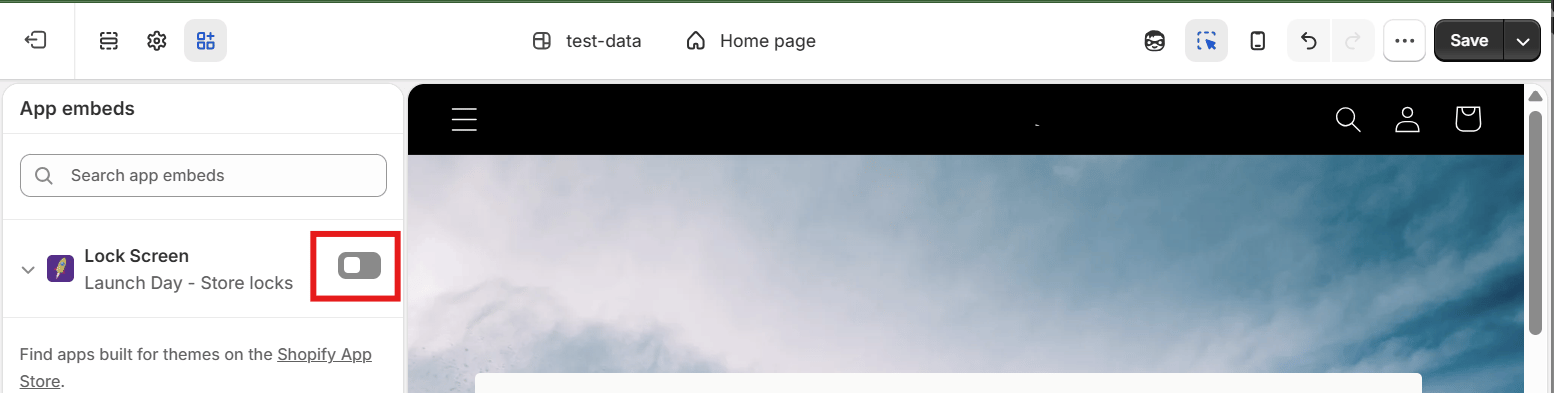
Launch Day enforces locks through a theme app extension block that has to be turned on in your theme.
  1. Go to Online Store → Themes → Customize.
  2. Open App embeds in the left sidebar.
  3. Confirm Launch Day: Lock Screen is turned on.
If it’s off, turn it on and save — locks should take effect immediately. Launch Day’s Dashboard also shows a warning banner if it detects this block isn’t active, with a direct Activate link.

You recently switched themes

Shopify doesn’t carry app embed blocks over automatically when you switch to a different theme (including duplicating your current theme and publishing the copy). If you changed themes recently, repeat the activation steps above on the new theme. Launch Day will email you and show a Dashboard warning if it detects this has happened.

Still not working?

If the block is confirmed active and you’re still seeing the issue, contact support@madvalley.com with your store domain and the name of the affected lock.